
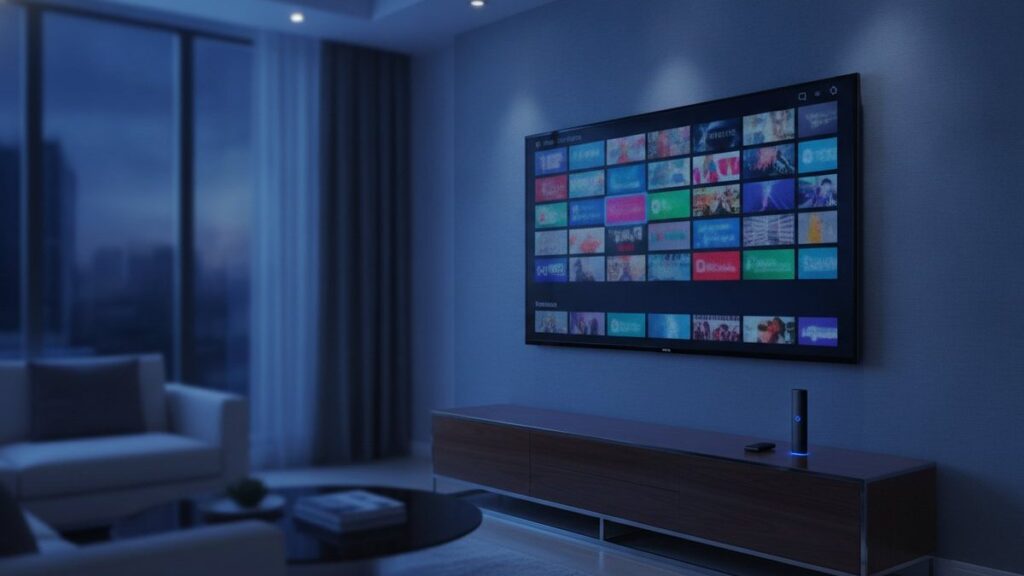
IPTV (Internet Protocol Television) is live TV and on-demand video delivered over your internet connection instead of through a cable line, a satellite dish or an aerial. You install a player app on a TV, stick, phone or computer, enter a login from a provider, and the channels stream to you the same way a YouTube video does. That is the whole idea. Everything else in this article is detail.
Definition in one sentence
IPTV is television sent as internet data packets to one viewer at a time, on request, rather than broadcast to everyone at once.
We run an IPTV service and answer the WhatsApp support line for it every day, so we hear the same questions over and over: is it the same as Netflix, do I need a box, why does my neighbour’s freeze and mine does not. This guide answers them in order, without the network-engineering vocabulary that most explanations hide behind.
What “internet protocol television” actually means
Break the name into its two halves and it explains itself.
Internet Protocol is the addressing system the whole internet runs on. Every device has an IP address, and data travels in small packets from one address to another. Your email, this web page and a video call all move the same way.
Television is the part that has not changed: live channels with a schedule, plus films and series.
Put together, IPTV means the channels reach you as packets addressed to your device. Cable and satellite work the other way round. They push one signal out to everyone in the area and your box tunes into the slice you want. That difference sounds small, but it is why IPTV can offer 25,000 channels where a cable package tops out at a few hundred, and why you can pause live TV or watch on a phone on the train.
The term is older than most people think. Telephone companies have used it since the mid-2000s for the TV service they sell over fibre, and the International Telecommunication Union published a formal definition in 2009 (ITU-T Y.1901). In everyday use today, “IPTV” almost always means a subscription from an independent provider that you watch through an app such as IPTV Smarters Pro or TiViMate.
How IPTV works, step by step
Here is what happens between a football match kicking off and it appearing on your screen. Five steps, and only the last two involve you.
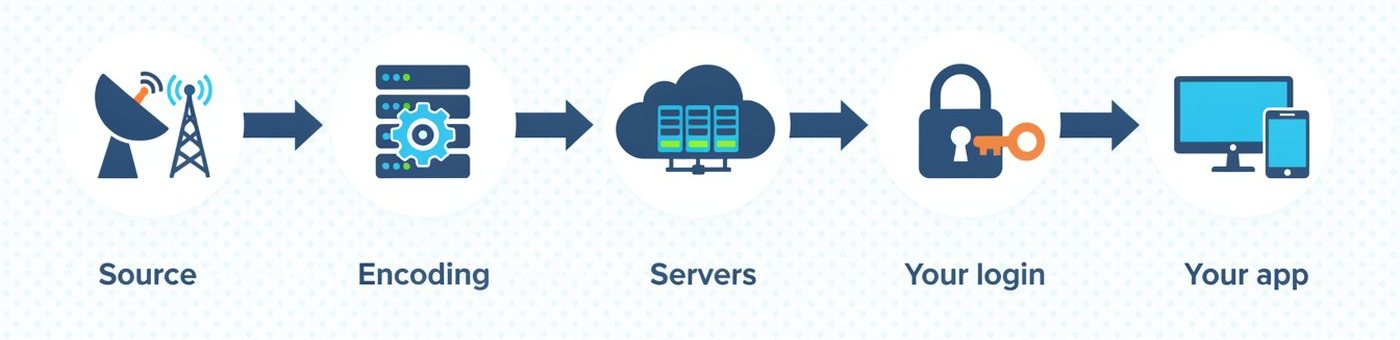
1. The source
Every channel starts as a broadcast feed, the same one a cable company or satellite operator receives. The provider captures those feeds at a facility called a head-end. For on-demand titles, the source is a video file stored on a server.
2. Encoding
Raw broadcast video is far too large to stream. Encoders compress each channel into a stream a home connection can carry, usually with the H.264 or H.265 codecs, and produce several versions: a 4K version at 15 to 25 Mbps, an HD version at 4 to 8 Mbps and an SD version at 1 to 2 Mbps. This is why a good provider lists the same channel three times. They are the same feed at different sizes.
3. Servers and delivery
The encoded streams sit on streaming servers, often spread across several countries so that viewers connect to one nearby. When you pick a channel, your app asks the server for that stream and the server sends it to your address only. This one-to-one delivery is called unicast, and it is the reason server capacity matters so much: a provider that sells more subscriptions than its servers can feed is the provider that freezes at kick-off.
4. Your login
The provider gives you three things: a server address, a username and a password. Together they are called an Xtream Codes login, after the software that made the format standard. Some apps prefer the same details packed into a single link called an M3U playlist. Either way, the login tells the server who you are, which channels you paid for and how many screens you can use at once.
5. The app decodes and plays
The player app on your device receives the packets, decodes the video and shows it. It also downloads the channel list and the programme guide (the EPG) so you can browse like you would on cable. Apps are just players. IPTV Smarters Pro, TiViMate and Smart IPTV do not own any channels; they show whatever your login gives them, which is why the same app can be free and still need a paid subscription behind it.
The full round trip, from your remote to the first frame on screen, takes one to three seconds on a healthy connection. If it takes longer, the delay is almost always in step 3 (an overloaded server) or between steps 3 and 5 (your Wi-Fi or your internet provider), and we cover both below.
The three kinds of content on an IPTV service
An IPTV subscription usually bundles three different things, and it helps to know which one you are using because they behave differently.
| Type | What it is | How it is delivered | Example |
|---|---|---|---|
| Live TV | Channels running to a schedule, exactly as broadcast | Continuous stream, a few seconds behind the broadcast | ESPN, BBC One, beIN Sports during a match |
| Catch-up (time-shifted) | Programmes that aired in the last few days, available to replay | Recorded by the provider, streamed on request | Last night’s news bulletin at breakfast |
| Video on demand (VOD) | A library of films and series | Stored files, streamed on request with pause and resume | A complete season of a drama |
Live TV is the part people buy IPTV for, especially sport. Catch-up depends on the provider and the app; TiViMate and IPTV Smarters Pro both support it when the provider offers it. VOD libraries vary from a few hundred titles to well over 100,000, and this is where you should read the small print, because “Netflix included” never means an actual Netflix account. It means titles that are also on Netflix appear in the provider’s library.
IPTV vs cable vs satellite vs streaming apps
People ask us how IPTV differs from what they already have. The honest comparison, based on what our customers were paying before they switched, looks like this.
| Cable | Satellite | Streaming apps (Netflix, YouTube TV) | IPTV subscription | |
|---|---|---|---|---|
| How it arrives | Coaxial cable to a rented box | Dish plus receiver | Internet, via each company’s own app | Internet, via any IPTV player app |
| Channels | 150 to 300 | 200 to 400 | Depends on the app; live TV apps carry 80 to 150 | 5,000 to 25,000+ |
| International channels | Add-on packs | Add-on packs | Rare | Included, by country |
| Typical monthly cost (US) | $80 to $150 | $70 to $130 | $8 to $83 per app | $6 to $20 |
| Contract | 12 to 24 months | 24 months | None | None |
| Needs a technician | Usually | Yes | No | No |
| Works away from home | Limited app | Limited app | Yes | Yes, on any device |
| Licensing | Fully licensed | Fully licensed | Fully licensed | Varies by provider (see below) |
The technical difference between a streaming app and IPTV is smaller than the marketing suggests. YouTube TV is, strictly, IPTV: television over internet protocol. The practical difference is that a streaming app is a closed system from one company with its own player, while an IPTV subscription is an open login you can use in any compatible player on any device. That openness is the appeal and, as the last row of the table hints, also the reason you need to choose a provider carefully.
What you need to watch IPTV
Four things. Most households already have three of them.
A device that runs an app
Any of these works: an Amazon Fire TV Stick, an Android TV or Google TV set, a Samsung or LG smart TV made after 2016, an Apple TV, an iPhone or Android phone, a Windows PC or Mac, or a dedicated box such as a Formuler or MAG. The Fire TV Stick 4K is the one we recommend to beginners because it costs under $50 and runs every app. Roku is the one platform with real limits, because it blocks sideloaded apps. Our setup guides cover each device with the exact menu names.
An internet connection
The numbers that matter are steady speed and stability, not the headline figure on your bill.
| What you watch | Minimum | Comfortable |
|---|---|---|
| One SD stream | 3 Mbps | 5 Mbps |
| One HD stream | 8 Mbps | 15 Mbps |
| One 4K stream | 25 Mbps | 50 Mbps |
| Two HD streams at once | 16 Mbps | 30 Mbps |
An Ethernet cable to the TV box beats Wi-Fi every time. About a third of the buffering complaints we handle are solved by moving the box off Wi-Fi or closer to the router, before we touch anything on the server side.
A player app
IPTV Smarters Pro is free, on every platform and the easiest to start with. TiViMate has the best guide and is what most people move to after a month. Smart IPTV is the choice for Samsung and LG TVs without a box. All three are covered in the setup guides, and all three accept the same login.
A subscription
This is the login from step 4 above. Prices run from about $6 a month on a yearly plan to $15 to $20 for a single month. A provider with a public website, a free trial, a refund policy and a support number is the baseline. If any of those four are missing, keep looking. Our own plans and prices are on one page with nothing hidden, and the free 24-hour trial exists precisely so you can check the service on your device before paying.
What an IPTV login actually contains
Because this confuses almost everyone in their first week, here is what arrives when a subscription is activated and what each part does.
- Server URL, for example
http://server.example:8080. The address the app connects to. The port number at the end is part of it. - Username and password. Your identity on that server. They control which channel packages you see and how many devices can stream at once.
- M3U link. The same three details packed into one address ending in
get.php?username=…&password=…. Used by VLC, Smart IPTV, Kodi and any player without an Xtream option. - EPG URL. Where the programme guide comes from. Most apps fetch it automatically from the Xtream login; a few ask for it separately.
The same login works on every device you own. What the plan limits is how many of them can play at the same moment. A one-device plan lets you install the app on the TV and your phone; it just will not play on both at once. We explain the difference between Xtream Codes and M3U logins in their own short guides.
Why IPTV buffers, and why free lists stop working
Two questions arrive on our support line more than any other, and both are really questions about how IPTV works.
Buffering means the app is playing video faster than packets are arriving. There are only three places the packets can be held up: the server, your internet provider’s network, or your home Wi-Fi. A good app tells you which: if every channel buffers, the problem is at your end or your ISP; if only one channel buffers, it is that stream’s server. Switching to the HD version of a 4K channel, moving to Ethernet or, when an ISP throttles streaming in the evening, using a VPN, fixes the large majority of cases. We walk through the full order of checks in our buffering guide, and the short version is that servers built for peak hours are what you are paying for.
Free M3U lists from forums and GitHub die for a mechanical reason. Each list is someone’s login, scraped and shared with thousands of people. The server sees one account streaming from a thousand addresses and blocks it, or simply cannot serve them all. Channels go dark within days, and the ones that survive freeze exactly when something worth watching is on. There is no support to message and no guide to load. A short free trial on a real service tells you in one evening what a free list would teach you over a month of dead links.
Five things people get wrong about IPTV
These come straight from our support chats. Each one costs someone an evening.
- “I need a special box.” No. A box is one option. A $40 Fire TV Stick, a smart TV from the last eight years or the phone in your pocket all run the same apps and get the same channels.
- “The app is the subscription.” The app is a player, like a web browser. IPTV Smarters Pro being free does not mean the channels are free; it means the player is. Searches for “IPTV Smarters Pro subscription” are really searches for a provider that works in it.
- “More channels means a better service.” A 25,000-channel list contains hundreds of duplicates and regional feeds you will never open. What matters is whether the 40 channels you actually watch are stable at 9 pm on a Saturday. That depends on servers, not list length.
- “4K needs a new TV.” It needs a 4K TV, which most sets sold since 2018 are, and a device that decodes 4K, which the Fire TV Stick 4K, Apple TV 4K, Nvidia Shield and Formuler boxes do. Older Firesticks and basic Android boxes are limited to 1080p.
- “A VPN is required.” It is not, unless your internet provider slows streaming traffic in the evening or, in parts of the UK and Europe, blocks specific servers on match days. Test without one first; add one only if streams fail on your home connection but work on mobile data.
Is IPTV legal?
The technology is legal everywhere. Hulu, Sling, YouTube TV and the TV service your phone company sells over fibre are all IPTV. What the law cares about is whether the provider has the rights to the channels it carries. Licensed services do; many independent providers operate in a grey area, and a few are plainly pirate operations. Enforcement in the United States has focused on operators and sellers, while in the United Kingdom and the European Union viewers have received warning letters and, in a small number of cases, fines. We keep an honest, country-by-country explanation in our legality guide rather than a one-line reassurance, because the answer genuinely depends on where you live and who you buy from.
How we know this
This guide is written by the team that runs Titan IPTV’s servers and support line. The speed figures come from bitrate measurements on our own streams in the second week of August 2026. The cable and satellite prices are what customers told us they were paying before switching, checked against published US price lists the same month. Where we describe how an app behaves, we tested it on a Fire TV Stick 4K Max, a 2022 Samsung TV and an iPhone 15 during the second week of August 2026. We sell an IPTV subscription, so read the comparison table with that in mind; the numbers in it are ones you can verify yourself.
Where to go next
If you want to see IPTV rather than read about it, the 24-hour free trial gives you the full channel list on your own device with no card. If you have a device in mind, the setup guides take ten minutes each. If the question in your head is which provider to choose, read our comparison of five IPTV services tested for a month. Which app and which box are the next two articles in this series.
Frequently asked questions
How does IPTV work in simple terms?
A provider captures TV channels, compresses them into internet-sized video streams and stores them on servers. Your player app logs in with a username, password and server address, asks for a channel, and the server streams it to your device alone. It is the same mechanism as watching a YouTube video, applied to live television.
Is IPTV the same as Netflix or YouTube TV?
Technically they are all television over internet protocol. The difference is that Netflix and YouTube TV are closed services with their own app and licensed catalogue, while an IPTV subscription is an open login that works in any compatible player, with far more live channels. Netflix is never included in an IPTV plan; only titles that also appear on Netflix are.
Do I need a box to use IPTV?
No. Any device that runs a player app works: Amazon Fire TV Stick, Android TV, Samsung and LG smart TVs, Apple TV, iPhone, Android phones, Windows PC and Mac. Dedicated boxes such as Formuler and MAG are optional and mainly offer a nicer remote and guide.
What internet speed does IPTV need?
A steady 8 Mbps handles one HD stream and 25 Mbps handles one 4K stream. For two TVs at once, plan on 30 Mbps. Stability matters more than headline speed, and a wired Ethernet connection to the TV device removes most buffering caused by Wi-Fi.
Why do free IPTV lists stop working?
A free M3U list is one account shared with thousands of people. The server either blocks it or cannot serve them all, so channels die within days and the survivors freeze during popular events. A paid subscription is a private account on servers sized for peak hours, which is what you are paying for.
Is IPTV legal?
The technology is legal everywhere; licensed services such as Hulu, Sling and YouTube TV are IPTV. What matters is whether a provider holds the rights to the channels it carries, which varies. Enforcement in the US targets operators, while some UK and EU viewers have received warnings. Read our legality guide for a country-by-country answer.
Ready to watch 25,000+ channels?
Order on WhatsApp and get your login in under 15 minutes. 7-day money-back guarantee.
Related articles
Best IPTV Box in 2026: Formuler Z11 vs Nvidia Shield vs Fire TV Stick 4K Max
The best IPTV box for most people is a Fire TV Stick 4K Max; daily viewers should look at the Formuler Z11…
September 4, 2026Best IPTV Apps in 2026: TiViMate vs Smarters vs Smart IPTV vs IBO Player
There is no single best IPTV app, only the best one for your device. We installed seven players on a Firestick, a…
September 2, 2026How Much Does IPTV Cost in 2026? Real Prices From 5 Providers
IPTV costs $15 for a month and $59 to $85 for a year on one device, which is $5 to $7 a…